
Students don’t struggle because they’re not smart — they struggle because they’re overwhelmed.
It’s not uncommon to sit down to work and immediately feel stuck. You have multiple classes, assignments piling up, maybe a project or two, and somehow you still don’t know where to start. You tell yourself you’ll “just begin,” but instead you end up switching between tasks, overthinking what matters most, or procrastinating entirely.
Most students think the issue is motivation. It’s not.
The real issue is lack of structure.
When you don’t have a clear system for managing your time, everything feels urgent, everything feels important, and nothing actually gets done efficiently.
This is where AI tools for student productivity become powerful — not for doing your work, but for helping you:
- organize your tasks
- prioritize what matters
- plan your time realistically
- stay consistent without burnout
Instead of feeling like you’re constantly catching up, AI can help you feel like you’re actually in control.
The Real Problem With Productivity
Most students think they don’t have enough time.
But in reality, time isn’t the problem — structure is.
You can have 6 hours to work and still accomplish less than someone with 2 focused hours if you don’t know what to do first. The biggest productivity killers are not laziness, they’re:
- unclear priorities
- decision fatigue
- poor planning
- constant task switching
A lot of procrastination actually comes from not knowing where to start. When your brain sees a huge, undefined workload, it avoids it entirely.
That’s why even motivated students still fall behind.
AI helps fix this by turning chaos into clarity.
Instead of staring at a long list of vague tasks, AI can:
- break large assignments into smaller steps
- help you decide what matters most
- create realistic plans based on your time
- reduce the mental effort of organizing everything
The difference between unproductive and productive students isn’t effort — it’s having a system that makes starting easy. A lot of procrastination actually comes from not knowing where to start, especially when assignments feel vague or open-ended (see Best AI Tools for Homework (2026)).
Best AI Tools for Student Productivity
1. ChatGPT
What it is:
A general AI assistant that helps you think, plan, and organize your work.
Why it’s useful for productivity:
ChatGPT is one of the best tools for turning a messy brain dump into a structured plan. When you don’t know where to start, it helps you create clarity instantly.
Real use case:
You have 5 assignments, a quiz, and a project due this week. Instead of guessing what to do first, you paste everything into ChatGPT and ask it to organize your week by priority and urgency.
Where it shines:
- breaking down overwhelming workloads
- prioritizing tasks
- creating daily or weekly plans
- reducing overthinking
Limitations:
- doesn’t automatically schedule your calendar
- depends on how clearly you describe your tasks
How to use in a daily workflow:
- List everything you need to do
- Ask ChatGPT to prioritize based on deadlines
- Turn tasks into smaller actionable steps
- Follow the plan and adjust as needed
2. Notion AI
What it is:
An all-in-one workspace with AI built in for organizing notes, tasks, and plans.
Why it’s useful for productivity:
Notion AI helps you keep everything in one place so you’re not constantly switching between apps. It’s especially powerful when your notes, tasks, and schedules all live in the same system instead of being scattered across different tools (see Best AI Note-Taking Tools for Students (2026)).
Real use case:
You create a weekly dashboard with all your classes, assignments, and deadlines, and use AI to auto-generate structured task lists.
Where it shines:
- organizing multiple classes
- tracking assignments and deadlines
- building long-term systems
- keeping everything centralized
Limitations:
- takes time to set up properly
- can feel overwhelming at first
How to use in a daily workflow:
- Capture all tasks in a Notion page
- Use AI to categorize and organize them
- Assign deadlines and priorities
- Review and update daily
3. Motion
What it is:
An AI-powered calendar that automatically schedules your tasks.
Why it’s useful for productivity:
Motion removes the hardest part of productivity — deciding when to do things.
Real use case:
You input your assignments and deadlines, and Motion automatically places them into your calendar based on priority and available time.
Where it shines:
- automatic scheduling
- balancing workload across days
- preventing overbooking
- adjusting plans when things change
Limitations:
- paid tool
- requires accurate task input
How to use in a daily workflow:
- Input all assignments and deadlines
- Let Motion auto-schedule tasks
- Follow the calendar blocks
- Let it adjust when tasks shift
This is what productive students actually do differently:
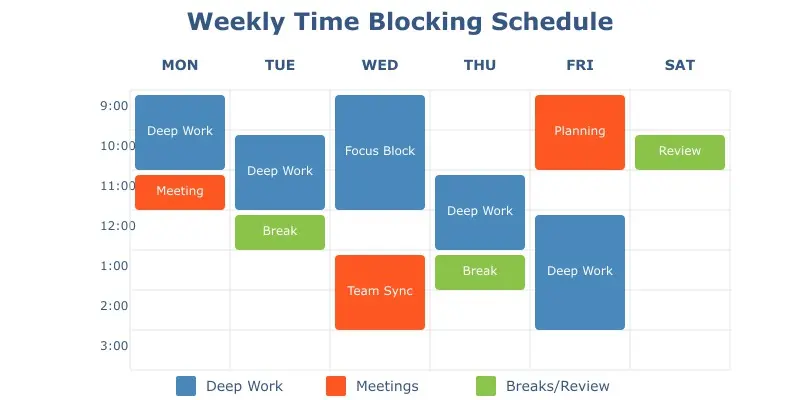
Turning a messy list of tasks into a structured schedule is what actually drives productivity.
4. Reclaim AI
What it is:
A smart calendar tool that protects your time and automatically schedules habits and tasks.
Why it’s useful for productivity:
Reclaim ensures you actually have time to do your work instead of overloading your schedule.
Real use case:
You block out daily study time, and Reclaim automatically shifts it around your schedule to make sure it still happens.
Where it shines:
- protecting focus time
- balancing academics and personal life
- preventing burnout
Limitations:
- works best with Google Calendar
- less useful without consistent habits
How to use in a daily workflow:
- Set recurring study blocks
- Add tasks and priorities
- Let Reclaim optimize your calendar
- Follow protected focus time
5. Todoist (AI Features)
What it is:
A task manager with AI-powered task organization and prioritization.
Why it’s useful for productivity:
Todoist helps you stay on top of everything without feeling overwhelmed by long to-do lists.
Real use case:
You quickly add tasks like “finish lab report tomorrow” and Todoist automatically organizes and prioritizes them.
Where it shines:
- simple task management
- quick capture of tasks
- prioritization
- reminders
Limitations:
- not a full scheduling system
- requires manual consistency
How to use in a daily workflow:
- Add tasks as they come up
- Use AI to organize them
- Assign priorities
- Complete tasks daily
6. Sunsama
What it is:
A daily planning tool designed to help you focus on what matters most.
Why it’s useful for productivity:
Sunsama forces you to be realistic with your day instead of overloading your schedule.
Real use case:
At the start of the day, you select your top 3–5 tasks and plan your schedule around them.
Where it shines:
- daily planning
- preventing overload
- focusing on fewer tasks
- building consistency
Limitations:
- paid
- requires discipline to use daily
How to use in a daily workflow:
- Review tasks for the day
- Select top priorities
- Plan realistic time blocks
- Focus on completing fewer tasks well
The Actual Productivity Workflow
Here’s what actually works:
- Capture tasks → use ChatGPT or Todoist
- Break them down → use ChatGPT or Notion AI
- Prioritize → ChatGPT or Todoist
- Schedule → Motion or Reclaim
- Execute → Sunsama for daily focus
- Review → Notion AI for tracking progress
This is the difference between feeling busy and actually being productive.
If you’re already using AI for studying, this is where everything connects — tools that help you learn still rely on strong systems to actually get work done (see Best AI Tools for Studying (2026)).
Common Productivity Mistakes Students Make
A lot of productivity issues come from a few repeat mistakes:
Relying on motivation
Motivation is inconsistent. If your system depends on “feeling like it,” you’ll fall behind the moment you don’t.
Not planning ahead
Waiting until the last minute forces you into reactive mode, which leads to more stress and lower quality work.
Overloading your schedule
Trying to do too much in one day usually backfires. You miss tasks, feel discouraged, and lose momentum.
Multitasking constantly
Switching between tasks kills focus. What should take 1 hour ends up taking 3.
Ignoring priorities
Not everything matters equally, but without a system, everything feels urgent.
👉 The fix isn’t working harder — it’s building a structure that makes it obvious what to do next.
Tips for Using AI Responsibly for Productivity
AI works best when it simplifies your workflow, not complicates it.
Keep your system simple
Don’t try to build the “perfect” setup. If it’s too complex, you won’t stick with it.
Avoid over-planning
Spending too much time organizing tasks can turn into another form of procrastination.
Review your plan daily
Even a solid schedule becomes useless if you don’t adjust it when things change.
Use AI as support, not a crutch
You still need to think critically about what matters and what doesn’t.
Focus on execution, not just planning
Productivity tools should help you do the work, not just organize it.

Study Setup That Actually Works With AI
Even with the best AI tools, your environment plays a huge role in whether you actually follow through.
Here’s a simple setup that works:
⏱️ Pomodoro Timer — for focus & consistency
Break your work into short, structured sessions (like 25–50 minutes). This makes it easier to start tasks and reduces burnout over long study sessions.
📓 Student Planner — for clarity & structure
Writing things down physically helps reinforce your schedule. It complements AI tools by making your priorities more concrete and visible.
🎧 Noise Cancelling Headphones — for deep work
Eliminates distractions so you can actually stay locked in, especially in noisy environments like libraries, dorms, or coffee shops.
👉 Together, these create an environment where it’s easier to start, stay focused, and actually finish your work.
FAQ
Why do I still procrastinate even when I have a plan?
Because most plans are too vague or unrealistic. If your plan says “work on project,” your brain still has to figure out where to start, so it delays. Good productivity systems (with AI) remove that friction by turning tasks into clear first steps and realistic time blocks.
How do I avoid building a system that looks productive but doesn’t actually get work done?
If you spend more time organizing tasks than completing them, your system is the problem. A good setup should make it faster to start work, not give you more things to manage. If it takes more than a few minutes to see what to do next, simplify it.
How do I know what actually matters when everything feels urgent?
Everything feels urgent when nothing is prioritized. The key is distinguishing deadlines from impact. AI can help surface urgency, but you still need to decide what actually moves you forward versus what just feels pressing in the moment.
What’s the simplest way to use AI for productivity without overcomplicating everything?
Use AI for one thing: turning a messy list of tasks into a clear, prioritized plan for today. If you can consistently know what to do next and start quickly, you’re already more productive than most students — everything else is optional.
Conclusion
Productivity isn’t about working more — it’s about working with structure.
Most students don’t need more time, they need a better system for using the time they already have.
AI makes that possible.
It helps you go from feeling overwhelmed to having a clear plan. It reduces decision fatigue, organizes your workload, and makes it easier to actually follow through.
When used correctly, AI tools for student productivity don’t just help you get more done — it helps you feel more in control, less stressed, and more consistent.
And that’s what real productivity looks like.
3 thoughts on “Best AI Tools for Student Productivity (2026)”