
Most students think AI is inconsistent.
Sometimes it gives great answers. Sometimes it’s vague, generic, or just not helpful. So it feels like a hit-or-miss tool.
But that’s not really what’s happening.
The difference usually comes down to one thing:
👉 how you ask
If your prompt is vague, your result will be vague. If your prompt is clear and structured, the output becomes much more useful.
That’s why some students feel like AI is powerful, while others feel like it barely helps.
This post shows you:
- how to write better ChatGPT prompts for students
- how to improve any prompt instantly
- and how to get consistent, high-quality results
If you want a full system for when and how to use AI, read The Ultimate AI Workflow for Students (2026) | Daily System That Actually Works.
Quick Answer: What Makes a Good Prompt
Good prompts aren’t complicated—they’re just intentional.
The best ChatGPT prompts for students are:
- Specific → clearly state what you want
- Structured → include steps or format
- Context-aware → explain your situation
- Interactive → allow follow-up
Most bad results don’t come from AI—they come from weak prompts.
Why Most Students Get Weak Results
Most students treat AI like a search engine.
They type something quick like “explain this” or “help with homework,” read the response once, and move on. When the answer feels generic or not that helpful, they assume the tool just isn’t that good.
But the issue usually isn’t the tool—it’s the interaction.
AI doesn’t figure out what you meant. It responds directly to what you gave it. So when your prompt is vague, it has to fill in the gaps, which is why the output feels inconsistent or off.
What’s happening is subtle, but it adds up quickly:
- Prompts are too vague → AI has to guess what you want, so answers come out generic
- No context is given → it doesn’t know your level, goal, or what you’re trying to do
- No structure is requested → responses come back as long paragraphs instead of something usable
- No follow-up → you stop at the first answer instead of improving it
- Using AI passively → reading outputs instead of interacting with them
When all of this happens, AI starts to feel hit-or-miss. Sometimes helpful, sometimes not.
But that inconsistency isn’t coming from the tool—it’s coming from how it’s being used.
The key shift is this: a prompt isn’t just a question. It’s an instruction. Once you start treating it that way, your results become much more predictable and useful.
The Prompt Framework That Actually Works
Instead of guessing what to type, you can follow a simple structure every time.
Think of prompts in 4 parts:
- Context → what you’re working on
- Task → what you want AI to do
- Constraints → how it should respond
- Format → how the output should look
This turns random prompts into clear instructions.
Example:
Instead of writing something vague like:
explain neural networks
You can write:
I’m studying neural networks for a beginner-level class. Explain the concept step-by-step in simple terms, include an example, and finish with a short summary.
That small change makes the output:
- clearer
- more structured
- easier to understand
Real Prompt Upgrades You Can Use Anywhere
This is where everything clicks.
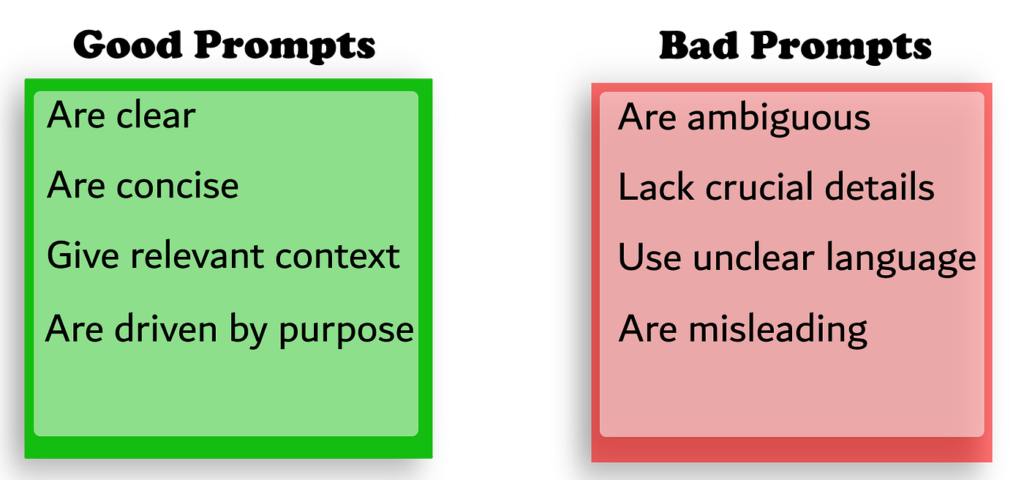
You don’t need brand new use cases—you just need to upgrade how you already use AI.
Here’s what that looks like in practice:
Understanding concepts
Instead of:
explain this
Use:
Explain this topic step-by-step like I’m new to it. Include an example, a real-world analogy, and a short summary.
You can also follow up with:
- “Simplify this even more”
- “What’s the most important idea here?”
- “Test me with 3 questions”
Why this works:
- turns a vague explanation into structured learning
- helps you actually understand, not just read
- makes AI act more like a tutor than a search tool
Writing assignments
Instead of:
help me write this
Use:
Give me 3 strong thesis ideas for this topic with different angles. Then create a structured outline with key arguments and examples.
Then refine with:
- “Make this more specific”
- “Add stronger examples”
- “Rewrite this to sound more natural”
Why this works:
- removes the blank-page problem
- improves structure before writing
- keeps your final work original and easier to build on
Studying
Instead of:
summarize my notes
Use:
Create 15 exam-level questions from these notes. Mix conceptual and application-based questions, then quiz me interactively.
You can also add:
- “Make the questions harder”
- “Explain why my answer is wrong”
- “Focus on my weak areas”
Why this works:
- forces active recall instead of passive reading
- helps you identify what you don’t understand
- makes studying feel closer to real exam conditions
Coding
Instead of:
fix this
Use:
Here’s my code and error. Explain what’s wrong step-by-step and guide me without giving the full solution.
Then refine with:
- “What concept am I misunderstanding?”
- “Give me a hint instead of the answer”
- “Show a minimal fix and explain each change”
Why this works:
- builds actual problem-solving skill
- prevents dependency on full solutions
- helps you debug faster while still learning
Research and finding sources
Instead of:
find sources for this topic
Use:
Find 5 credible sources for this topic. Briefly summarize each one and explain how I could use them in an academic paper.
Then refine with:
- “Make sure sources are recent”
- “Focus on academic or peer-reviewed sources”
- “Highlight the strongest arguments”
Why this works:
- saves time during research
- improves quality of sources
- makes it easier to turn research into writing
If you specifically use AI for finding sources, organizing ideas, or improving academic writing, read Best AI Tools for Research Papers (2026).
Fixing weak AI answers
Instead of giving up when AI gives a bad response, improve it:
Use:
This answer is too vague. Make it more specific, add examples, and simplify the explanation.
Or:
Rewrite this with clearer structure and better explanations.
You can also say:
- “Make this more concise”
- “Add step-by-step breakdown”
- “Explain this like I’m a beginner”
Why this works:
- teaches you that AI is iterative
- improves consistency across responses
- helps you get better results without starting over
How to Improve Any Prompt Instantly
You don’t need to memorize prompts—you just need to improve them slightly.
A few small changes can completely transform your results.
Simple upgrades that always work:
- Add your level → beginner, intermediate
- Ask for examples → improves clarity
- Ask for structure → steps, bullets
- Ask for difficulty → easier or harder
- Ask for feedback → makes it interactive
Quick example:
explain this concept
Becomes:
Explain this concept step-by-step at a beginner level, include an example, and test me with 3 questions.
That’s all it takes.
What Better Students Do Differently With AI
The biggest difference isn’t access to better tools—it’s how they’re used.
Most students use AI to finish tasks as quickly as possible. They’re focused on getting an answer, submitting the work, and moving on. That works short-term, but it doesn’t actually improve how they think or learn.
Better students use AI differently. They use it to make their thinking clearer and their process more efficient.
Instead of asking for answers immediately, they focus on understanding and refining.
What that looks like in practice:
- They try first, then use AI → so they know exactly where they’re stuck
- They ask for explanations, not just answers → which builds real understanding
- They refine responses instead of stopping early → making outputs more useful
- They guide AI’s behavior → turning it into something interactive instead of static
- They stay engaged → questioning, testing, and improving the response
Their prompts also reflect this:
- “Act like a tutor and guide me step-by-step”
- “Don’t give the full answer—help me think through it”
- “Challenge my answer and explain what I got wrong”
- “Ask me follow-up questions to test my understanding”
This changes how AI is used entirely. It goes from a shortcut to something that actually helps you think better.
Most students use AI to get through work.
Better students use AI to get better at the work.
That difference is what makes AI actually valuable over time.
The AI Tools Students Actually Use
You don’t need a complicated setup.
- ChatGPT → main prompting tool
- Claude → structured writing
- Quizlet → recall
- Gamma → presentations
- Notion → organization
The advantage comes from using each tool intentionally. If you’re willing to upgrade to more powerful tools, check out Best Paid AI Tools for Students (2026).
Focus Tools That Improve Your Results
Writing better prompts isn’t just about what you type—it’s about being focused enough to actually think through what you’re asking.

If you’re distracted or mentally tired, your prompts get rushed and vague, which leads to worse results.
A few simple tools can make it much easier to stay locked in:
- Noise-canceling headphones → help you stay focused while thinking through prompts, especially when you need to be precise
- Blue light glasses → reduce eye strain during longer sessions so you don’t rush through prompts just to be done
- Desk lamp → keeps you alert and focused, especially during late-night work when your thinking would normally get sloppy
These aren’t about setup—they directly affect how clearly you think, which is what actually leads to better prompts.
FAQ
Why do some ChatGPT prompts work much better than others?
Because AI responds directly to how clearly you guide it. A vague prompt forces the AI to guess what you want, which leads to generic answers. A strong prompt removes that ambiguity by adding context, structure, and constraints—so the response is more tailored and useful.
How detailed should my prompts be before it becomes overkill?
You don’t need to overcomplicate things, but you should include enough detail that AI doesn’t have to guess. A good rule is: if a human could misunderstand your request, the AI will too. Start simple, then add detail only where needed—like your level, the format you want, or the goal you’re trying to achieve.
Is it better to write one perfect prompt or refine it over time?
Refining is almost always better. The best results usually come from a short back-and-forth, not a single prompt. Start with a clear request, then improve it by asking follow-ups like “make this simpler,” “add examples,” or “test me on this.” That’s how you turn AI into something interactive instead of static.
How do I know if a prompt actually helped me learn something?
A simple test is whether you can explain the concept without AI right after using it. If you can’t, the prompt probably gave you an answer without building understanding. Good prompts should help you think, not just give you information.
Conclusion
Most students think using AI effectively is about finding the “best prompts.”
But it’s really about understanding how to guide the tool.
Once you stop treating prompts like quick questions and start treating them like instructions, everything changes. Your results become more consistent, your understanding improves, and you spend less time going back and forth trying to get something useful.
That’s the real shift.
You don’t need to memorize dozens of prompts. You just need to:
- add a bit more context
- ask for structure
- and refine your requests instead of stopping after one response
If you start doing that, you’ll notice AI feels a lot less random—and a lot more like something you can actually rely on.
Over time, that’s what separates students who occasionally use AI from those who genuinely know how to use it well.