
Online classes should be easier.
You can learn from anywhere, rewatch lectures, and technically go at your own pace. But most students quickly realize the opposite happens—you zone out, fall behind, and end up rewatching content without actually understanding it.
The problem isn’t effort. It’s the format.
Online classes remove structure. There’s no pressure to stay engaged, no real-time accountability, and distractions are always one tab away. Even if you’re motivated, the system makes it harder to learn efficiently.
That’s why the best AI tools for online classes aren’t just “nice to have”—they fix the core problems of virtual learning.
Instead of passively watching lectures, AI lets you:
- stay mentally engaged during class
- capture everything without missing details
- quickly recover when you lose focus
- review content in a way that actually sticks
Once you start using AI the right way, online classes stop feeling like something you have to survive—and start becoming something you can actually control.
Why Online Classes Fail (And It’s Not Your Fault)
Most students blame themselves when they fall behind in online classes. But if you look at how these classes are structured, the problem becomes obvious.
Online learning removes almost everything that makes in-person learning effective.
You’re not in a focused environment. You’re not surrounded by people paying attention. There’s no natural pressure to stay locked in. Instead, you’re sitting at your laptop where everything else—messages, videos, random tabs—is competing for your attention.
That leads to predictable problems:
- you start lectures focused, then slowly drift
- you tell yourself you’ll rewatch later, but never fully do
- your notes become incomplete or messy
- assignments pile up without a clear system
Even worse, online classes encourage passive behavior. You’re watching instead of thinking, listening instead of interacting. Over time, that kills retention.
This is why most students feel like they’re putting in time but not getting results.
The issue isn’t discipline—it’s that the system is built for passive consumption.
How AI Changes Online Learning
AI works because it forces interaction back into the process.
Instead of sitting through lectures and hoping something sticks, you can actively engage with the material in real time or immediately after.
For example:
- instead of rewatching a lecture, you can summarize it instantly
- instead of being confused, you can ask for clarification immediately
- instead of rereading notes, you can turn them into questions
This shift is what actually improves learning.
AI doesn’t replace the lecture—it transforms what you do with it.
If you’ve already explored broader AI workflows, you’ve probably seen how students use AI across studying, writing, and productivity. Online classes are just where the impact becomes the most obvious, because the default experience is so inefficient.
Best AI Tools for Online Classes (By Real Problems)
Most lists just throw tools at you. That’s not helpful.
What actually matters is matching each tool to a problem you face during online classes.

ChatGPT → Fixing the “I Zoned Out” Problem
Every student zones out during online lectures—it’s almost unavoidable. The difference is whether you can recover quickly or end up falling behind for the rest of the week.
ChatGPT is the fastest way to bridge that gap.
Instead of rewatching entire lecture recordings (which most people don’t actually do effectively), you can turn whatever notes or transcript you have into a structured, easy-to-understand breakdown. But what makes it powerful isn’t just summarization—it’s the ability to interact with the content.
You’re not stuck with what the professor said. You can reshape it into something that actually makes sense.
What it helps you do:
- Turn messy lecture notes into clear summaries
- Break down complex concepts into simpler explanations
- Generate practice questions for active recall
- Re-explain topics in different ways until they click
A simple but effective workflow:
- paste your lecture notes or transcript
- ask for “key concepts only”
- follow up with “explain this step-by-step”
- finish with “quiz me on this topic”
This turns a passive lecture into an active learning session in minutes.
If you want to build a full system around this, check out How to Use AI for Studying (2026) for deeper workflows.
Notion AI → Fixing the “Everything Is Disorganized” Problem
Online classes don’t just make learning harder—they make organization harder.
Notes are scattered, assignments pile up, and deadlines feel unclear until they’re suddenly urgent.
Notion AI helps you turn all of that into a structured system.
Instead of juggling multiple apps or relying on memory, you can keep everything in one place and let AI organize it for you.
What you can use it for:
- Creating clean, structured notes for each class
- Tracking assignments and deadlines in one dashboard
- Organizing weekly study plans
- Converting messy notes into readable summaries
The real benefit isn’t just organization—it’s consistency.
When everything is in one system, it’s easier to:
- stay on top of work
- avoid last-minute stress
- build a repeatable routine
If you’re trying to improve your overall workflow and time management, this ties directly into Best AI Tools for Student Productivity (2026).
Grammarly → Fixing the “Writing Takes Too Long” Problem
Online classes rely heavily on writing—more than most students expect.
Discussion posts, short responses, essays, and even emails to professors can start to pile up quickly. Even if you understand the material, writing clearly and efficiently takes time.
Grammarly helps remove that friction.
Instead of spending extra time rewording sentences or second-guessing your writing, you can focus on your ideas while it refines how you express them.
What it improves:
- Clarity and readability of your writing
- Grammar and small mistakes you might miss
- Tone, so your writing sounds more confident and professional
This is especially useful when:
- you’re writing quickly under time pressure
- you want your responses to sound more polished
- you’re not sure if something is phrased clearly
If writing is a big part of your workload, you can explore more tools and strategies in Best AI Tools for Essay Writing (2026).
Otter.ai → Fixing the “I Can’t Keep Up With Notes” Problem
Taking notes during online lectures is one of the biggest hidden struggles.
You’re trying to listen, understand, and write at the same time—and usually end up doing all three poorly.
Otter removes that bottleneck completely.
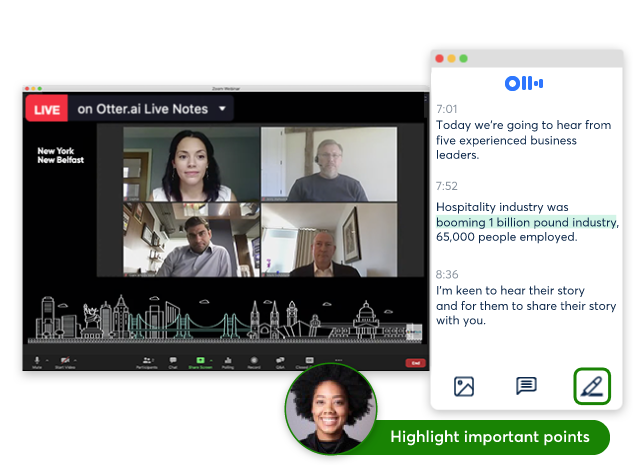
By transcribing lectures in real time, it captures everything being said without requiring your attention. That means you can stay focused on understanding the material instead of worrying about missing something important.
Over time, this creates a huge advantage.
Instead of relying on incomplete notes, you have a full, searchable record of every lecture.
What makes it especially useful:
- Real-time transcription during live classes
- Automatically saved lecture records
- Searchable keywords so you can find exact explanations
- Ability to revisit specific parts without rewatching everything
After class, this becomes even more powerful when paired with tools like ChatGPT to summarize or clarify key sections.
Perplexity AI → Fixing the “I Don’t Understand This” Problem
One of the biggest frustrations in online classes is not understanding something in the moment.
In a physical classroom, you might ask a question or quickly clarify things. Online, that gap often stays unresolved—and small confusion turns into bigger problems later.
Perplexity fixes that instantly.
It acts like a smarter search engine that gives you direct, clear answers instead of forcing you to dig through multiple websites.
What makes it powerful:
- Instant explanations for unfamiliar concepts
- Sources included for verification
- Clear answers without unnecessary fluff
This makes it perfect for:
- quick lookups during lectures
- understanding unfamiliar terms
- clarifying confusing topics before they build up
So instead of letting confusion stack up, you clear it instantly and stay on track.
Canva → Fixing the “Presentations & Projects Take Too Long” Problem
Even in online classes, you’re still expected to create things—presentations, slides, visuals, and group project deliverables.
The problem is that these tasks often take longer than they should, especially if you’re starting from scratch or trying to make everything look polished.
Canva removes that friction.
Instead of worrying about design, formatting, or layout, you can use pre-built templates and AI tools to create clean, professional work quickly.
What it helps with:
- Building presentations without spending hours on design
- Creating visually appealing slides that look polished
- Generating layouts and ideas instantly
- Collaborating with teammates in real time
The biggest advantage is speed.
You can go from nothing to a complete, structured presentation much faster than traditional tools, while still producing something that looks high quality.
For group projects, this becomes even more valuable:
- everyone can contribute easily
- work stays organized in one place
- you avoid last-minute chaos
If presentations are a big part of your classes, you can explore more tools and strategies in Best AI Tools for Presentations (2026).
Online Classes vs In-Person: Where AI Helps More
In-person classes naturally force engagement.
You’re physically there, paying attention, and following along in real time. Even if you lose focus briefly, the environment pulls you back in.
Online classes don’t have that.
They rely entirely on your ability to stay focused, which is unrealistic over long periods of time. That’s why students feel more drained and less productive, even though they’re technically spending the same amount of time.
This is where AI makes the biggest difference.
It compensates for what online classes lack:
- structure
- interaction
- immediate feedback
With AI, you’re not just watching—you’re actively processing information, clarifying confusion, and reinforcing what you learn.
That’s what turns online classes from inefficient to effective.
How to Stay Focused in Online Classes Using AI

Focus isn’t about willpower—it’s about structure.
AI gives you a simple way to create that structure without adding extra effort.
After each lecture, instead of moving on immediately, take a few minutes to interact with the material. Summarize what you just learned, identify what didn’t make sense, and turn the content into questions you can answer.
This does two things:
- it forces your brain to engage with the material
- it prevents information from fading immediately
You can also break longer lectures into smaller chunks. Instead of sitting through an entire session passively, treat it like multiple short segments where you actively process information in between.
Another important shift is removing unnecessary multitasking. AI already saves you time, so there’s no need to split your attention across multiple things.
If you’re trying to build better habits around this, our How to Use AI Without Getting Lazy (2026) post is perfect for you.
Study Tools That Pair Well With AI
AI helps you process information faster, but your setup matters just as much—especially when you’re spending hours in online classes.
- Blue Light Glasses – Staring at a screen for long lectures can quickly lead to eye strain and fatigue. Blue light glasses help reduce that strain so you can stay focused longer without feeling drained halfway through class.
- Desk Lamp – Lighting has a bigger impact than most people realize. A good desk lamp reduces eye strain, improves visibility, and helps you stay alert during early morning or late-night lectures.
- Laptop Stand – Watching lectures hunched over your laptop gets uncomfortable fast. A laptop stand brings your screen to eye level, improving posture and making it easier to stay focused for longer sessions.
These tools don’t directly improve your understanding—but they remove physical distractions that make it harder to stay engaged. Combined with AI, they help create a setup where you can actually stay focused throughout your online classes.
Common Mistakes Students Make
Even with the right tools, it’s easy to fall into habits that limit your results.
One of the biggest mistakes is treating AI like a shortcut instead of a way to engage more deeply. If you only rely on summaries, you might feel like you understand the material—but you haven’t actually worked through it.
Other common mistakes include:
- Watching lectures passively instead of interacting with the material afterward
- Skipping review entirely and assuming one exposure is enough
- Using AI to do the work for you instead of helping you understand it
- Multitasking too much, which defeats the purpose of saving time with AI
The goal isn’t to do less—it’s to use AI to learn more efficiently while staying actively involved.
FAQ
How do you stay focused in online classes?
The biggest factor is structure. Instead of just watching lectures, use AI to summarize, question, and interact with the material right after. That keeps your brain engaged and prevents you from drifting.
Can AI replace lectures completely?
Not really. Lectures give you the foundation and context, but AI helps you process and understand that information much faster. It’s best used alongside lectures, not instead of them.
What’s the fastest way to catch up if I fall behind in an online class?
Don’t try to rewatch everything. Use AI to summarize missed lectures, identify key topics, and focus only on what actually matters. Then test yourself on those concepts instead of passively reviewing.
How do I stop zoning out during online lectures?
You won’t rely on willpower alone. The easiest fix is knowing you’ll review right after—summarize the lecture and turn it into questions. That forces you to stay more engaged while watching because you know you’ll actually use the material.
Conclusion
Online classes aren’t inherently bad—they’re just easy to use the wrong way.
Without structure, they become passive, distracting, and inefficient. That’s why so many students feel like they’re putting in time but not actually making progress.
AI changes that.
It gives you a way to stay engaged, recover when you lose focus, and turn lectures into something interactive instead of passive. More importantly, it helps you build a system around your classes instead of relying on motivation alone.
When you combine the right tools with the right approach, online classes stop feeling overwhelming. Instead of falling behind, you stay in control of your workload—and actually understand what you’re learning along the way.