Lab reports aren’t hard because of writing — they’re hard because of thinking.
Most students don’t struggle to type sentences. They struggle with:
- “I have data… but what does it actually mean?”
- “Why don’t my results match theory?”
- “What am I even supposed to say in the discussion section?”
That’s where AI tools for lab reports actually become useful — not for writing for you, but for helping you interpret, structure, and explain your results clearly.
This guide isn’t about generic AI tools. It’s about how to go from:
👉 raw data → actual explanation → clean lab report
The Real Problem With Lab Reports
The biggest misconception students have:
Data = explanation
It doesn’t.
You can have perfect graphs, tables, and measurements… and still have no idea how to explain them.
Where students get stuck:
- Writing the discussion section
- Explaining unexpected results
- Distinguishing:
- Results = what happened
- Interpretation = why it happened
This is exactly where AI helps — not by giving answers, but by helping you:
- Turn numbers → meaning
- Structure reasoning logically
- Identify possible errors or trends
If you’ve read something like Best AI Tools for STEM Students (2026), those tools help broadly — but here we’re focusing specifically on lab report thinking and explanation.
Best AI Tools for Lab Reports
We’re not just listing tools — we’re showing how each one fits into this pipeline:
👉 RAW DATA → INTERPRETATION → EXPLANATION → FINAL REPORT
1. ChatGPT
What it is:
A conversational AI that helps break down and explain complex ideas.
Why it’s useful for lab reports:
It’s best for turning confusing results into clear explanations.
Real use case:
Your voltage readings don’t match expected theoretical values — you don’t know how to explain why.
Where it shines:
- Explaining trends in simple terms
- Generating possible error sources
- Structuring discussion sections
Limitations:
- Can sound confident but be wrong
- Needs precise prompts to be useful
How to use this in a lab report workflow:
Step 1: Input your raw results
Step 2: Ask: “Explain possible reasons these results differ from theory”
Step 3: Refine: “Make this explanation more technical and structured”
Step 4: Convert into discussion paragraph
2. Claude
What it is:
An AI tool known for deeper reasoning and long-form explanations.
Why it’s useful for lab reports:
Better at logical explanations and structured thinking than most tools.
Real use case:
Your graph trend is unexpected and you need to explain why the pattern exists.
Where it shines:
- Deep reasoning
- Connecting theory to results
- Writing detailed discussion sections
Limitations:
- Can be slower
- Sometimes overly verbose
How to use this in a lab report workflow:
Step 1: Paste your dataset + expected theory
Step 2: Ask for a step-by-step explanation of discrepancies
Step 3: Ask it to identify key reasoning points
Step 4: Turn those into structured paragraphs
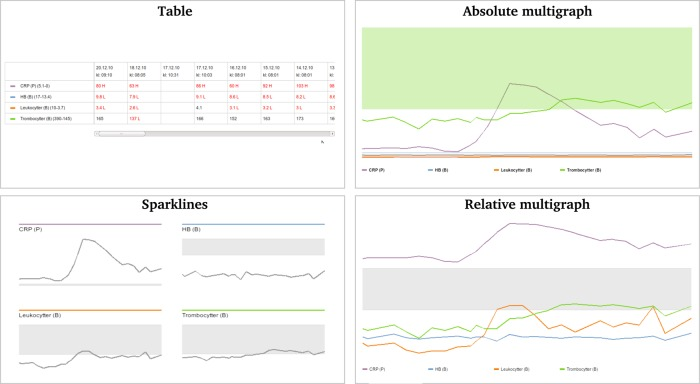
Example of raw lab data and graph outputs — the real challenge is explaining what these trends actually mean in your discussion section.
3. Overleaf
What it is:
A LaTeX editor used for professional scientific writing.
Why it’s useful for lab reports:
Perfect for structuring full reports cleanly.
Real use case:
You need to organize your report into abstract → methods → results → discussion → conclusion.
Where it shines:
- Clean formatting
- Equations and figures
- Professional structure
Limitations:
- Learning curve
- Not helpful for interpretation
How to use this in a lab report workflow:
Step 1: Create structured sections
Step 2: Insert your results and graphs
Step 3: Add AI-generated explanations
Step 4: Format into final polished report
4. Grammarly
What it is:
An AI writing assistant for clarity and correctness.
Why it’s useful for lab reports:
Helps turn messy explanations into clear, academic writing.
Real use case:
Your explanation makes sense in your head, but reads awkwardly.
Where it shines:
- Clarity
- Grammar
- Academic tone
Limitations:
- Doesn’t improve logic
- Can oversimplify technical writing
How to use this in a lab report workflow:
Step 1: Write your raw explanation
Step 2: Run through Grammarly
Step 3: Adjust tone for technical clarity
Step 4: Final polish before submission
5. Notion AI
What it is:
An AI-powered workspace for organizing ideas and writing.
Why it’s useful for lab reports:
Great for breaking down thoughts before writing.
Real use case:
You don’t know how to structure your discussion section.
Where it shines:
- Organizing ideas
- Structuring sections
- Drafting outlines
Limitations:
- Not strong for deep technical reasoning
- Needs refinement
How to use this in a lab report workflow:
Step 1: Dump raw thoughts about your results
Step 2: Ask AI to structure into sections
Step 3: Expand each section
Step 4: Move into final report
6. Wolfram Alpha
What it is:
A computational engine for math and science.
Why it’s useful for lab reports:
Helps verify calculations and connect data to theory.
Real use case:
You need to check if your calculated values align with theoretical expectations.
Where it shines:
- Calculations
- Graphs
- Formula validation
Limitations:
- Not good for writing explanations
- Requires correct inputs
How to use this in a lab report workflow:
Step 1: Input formulas and data
Step 2: Generate theoretical results
Step 3: Compare with your data
Step 4: Use differences in discussion
The Actual Workflow (Most Important)
Here’s how everything fits together:
- Collect data
→ Run experiments and record results - Analyze patterns
→ Use Wolfram Alpha for calculations - Explain results
→ Use ChatGPT / Claude to interpret - Compare with theory
→ Identify mismatches and causes - Write discussion
→ Use Notion AI to structure - Final polish
→ Use Grammarly + Overleaf
This is what separates a mediocre lab report from a strong one.
— Lab reports require more technical explanation than storytelling, but if you’re also working on longer structured writing, tools from Best AI Tools for Essay Writing (2026) can help.
Common Mistakes Students Make With AI
- Copying explanations without understanding
- Generating fake reasoning
- Ignoring mismatched results
- Trusting AI over actual data
- Writing “perfect sounding but wrong” reports
The biggest mistake:
Using AI to replace thinking instead of improving it
Tips for Using AI Responsibly in Lab Reports

- Always verify explanations against your data
- Use AI to generate ideas, not final answers
- Rewrite explanations in your own words
- Double-check anything involving theory
- Treat AI like a thinking assistant, not a shortcut
Study Setup That Actually Works With AI
These aren’t random — they directly improve your lab workflow:
- Scientific Calculator
Helps verify calculations quickly so you’re not blindly trusting AI outputs. - Whiteboard Notebook
Perfect for sketching out explanations and debugging mismatches before writing. - Desk Lamp
Keeps long lab sessions focused — especially when you’re analyzing data late.
FAQ (Lab Report Specific)
How do I explain results that don’t match theory?
Start by identifying assumptions in the theory (ideal conditions, no loss, etc.). Then compare those to your actual setup. Use AI to generate possible causes like measurement error, environmental factors, or limitations in equipment — but always verify them.
Can AI write my entire lab report?
Technically yes, but it’s a bad idea. Lab reports require understanding. If you can’t explain your results yourself, you’ll lose points — and possibly get flagged.
How do I use AI for the discussion section?
Feed in your results and ask for interpretation, then refine it into structured reasoning. Don’t copy — extract key ideas and rewrite them.
What’s the best way to check if AI explanations are correct?
Compare with your textbook, lecture notes, or known theory. If AI gives a reason, ask: “Does this actually match my experiment conditions?”
Conclusion
Lab reports aren’t about writing — they’re about explaining why your results happened.
That’s where most students struggle.
AI doesn’t magically fix your report — but it speeds up the thinking process:
- Turning data into meaning
- Helping you structure explanations
- Making your writing clearer
If you use it correctly, you’re not just finishing reports faster — you’re actually understanding your experiments better.
And that’s what leads to better grades.
1 thought on “Best AI Tools for Lab Reports (2026)”